IT Audit
Leave the site with the assessment scored and the deck already built.
The billable hours in an IT audit are rarely the audit. They are the evening afterwards, turning notes into something a client will sit through. IT Audit scores a company’s estate against a structured template and builds the client-facing deck off that assessment and the deal, so the report is waiting for you rather than ahead of you. It is an add-on, bought from the Marketplace rather than switched on in settings: nothing here is something a new account discovers already running, and this page is written on the assumption you are the one deciding whether to buy it. A second add-on, the Network Scanner, adds evidence collected from the estate itself. It exists because assessment-led selling is how companies that sell IT services actually win the work.
In the product
Assessments, against the companies they belong to.
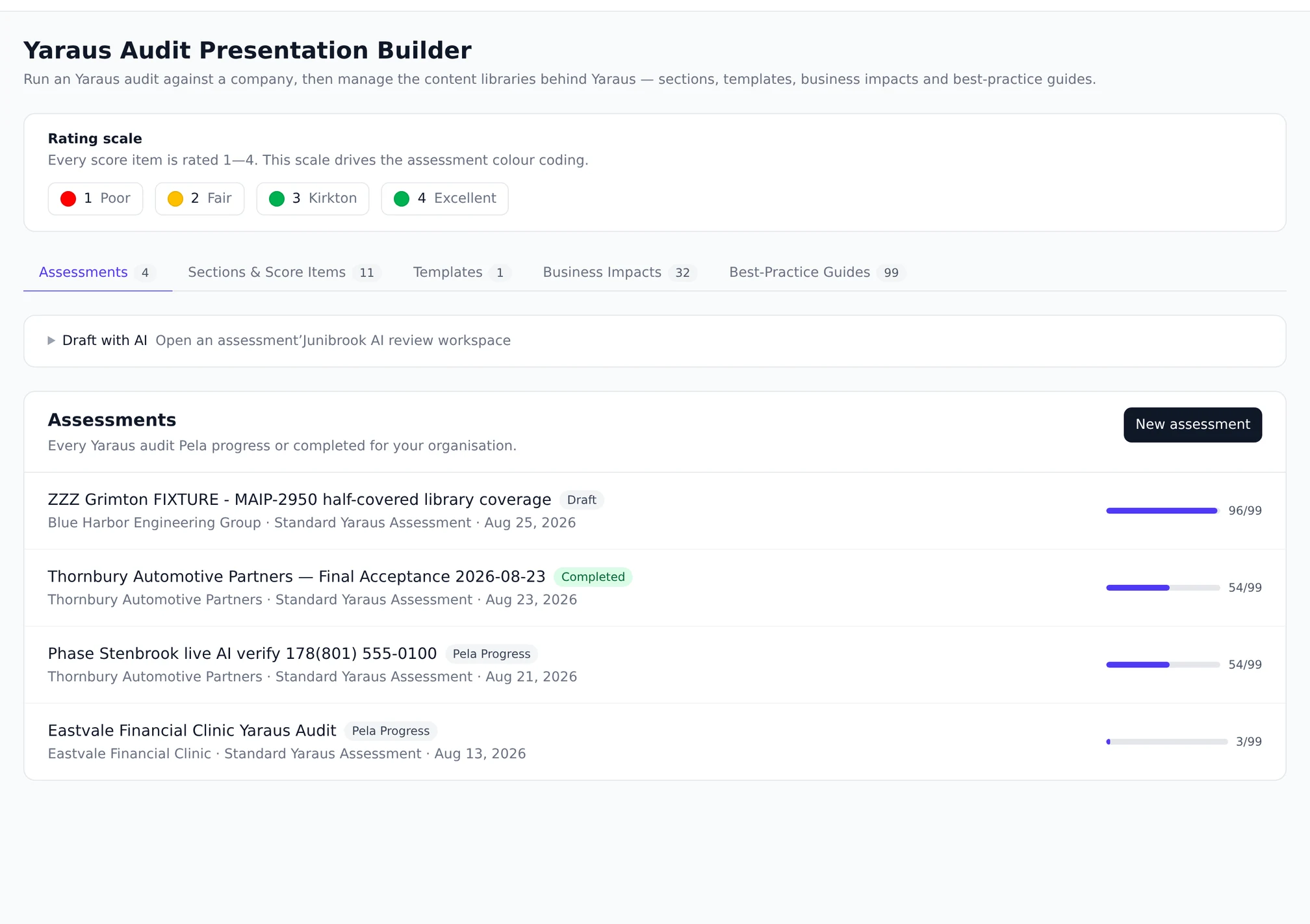
The assessment
What you gather, and what you score
An audit is two halves. One is what the customer told you, in their words. The other is what you found, rated on a scale that means the same thing in every audit you run.
The evidence (add-on)
What the estate itself can tell you
The Network Scanner is a second add-on on top of IT Audit. It files observed findings against the assessment — from endpoint agents, an external perimeter check, an email-security check and a cloud posture read.
The deck
And what the customer actually sees
The output is a client-facing presentation, built from the assessment and anchored to a deal. These two pages are how it is assembled and how it is checked before it leaves.
The library
The content behind every audit
Sections, score items, maturity descriptions, business impacts and templates. Editing them shapes future assessments and never rewrites one already in flight.
The arc
Fact-find, score, present, re-audit — and what is frozen at each step.
The pages above are the parts. This is the whole, in the order it happens, with the four moments where something stops being editable. Those moments are what make an audit a document rather than a working file.
Building an assessment takes a copy.
The template’s active sections and score items, in order, are snapshotted into the assessment at the moment it is created, and the total number of items is stamped alongside them. Everything afterwards reads that snapshot. That is what makes the library safe to edit: an audit in flight is not reading the live rows and cannot be reshaped underneath somebody by an edit somewhere else.
It also fixes the denominator. A coverage figure recorded in March still means what it meant in March, rather than quietly improving because five items were retired from the library in April.
Two halves, and they are never merged.
Discovery is twenty-seven self-declared fields about the business, of which eight are the roster the completion figure is measured against. Scoring is every item in the snapshot rated one to four, with a 90-day goal derived by a fixed mapping rather than chosen. Neither half fills in the other: an unscored item gets no goal, and an unanswered question stays unanswered.
Completion is a lifecycle state and not a threshold. There is no progress gate, so an assessment with legitimately blank items can still be completed — and completing it locks the content, with reopening the only way back in.
The deck is anchored to two things it cannot swap.
A presentation names one deal and one assessment, they are checked at creation to agree about the company, and neither can be changed afterwards. Money comes from a linked quote and is read exactly as stored, never recalculated at render time, and there is no cost field on a roadmap item to disagree with it. Review status is informational and gates nothing.
A successful render writes two stored objects: the canonical export, and a copy registered as a stage artifact on the deal’s own document trail, with independent lifecycles.
And then the same audit again, later.
A re-audit always inherits the template of the audit it follows, rather than letting the caller pick one. That is what makes the comparison item-by-item rather than a join across two differently shaped documents, and library drift since then is reported honestly as items added or removed. The earlier assessment is never written to — not its status, not a score, not a timestamp. It is the before.
Cost consent
Three switches, and they do not all default the same way.
This pillar leans on nothing being able to trigger a paid call without a decision. That is true of two of the three switches below and not of the third, and the third is the one worth reading twice.
The module: off until it is bought.
IT Audit is sold through the Marketplace. Provisioning creates its registry row inactive, and there is no settings toggle for it at all — a Marketplace install is the only way it becomes active, per workspace. Until then none of this exists in your account. The Network Scanner add-on works the same way and needs IT Audit installed first.
AI autofill: off, with per-flow gates underneath it.
The drafting that fills scoring, discovery and findings sits behind a second flag which defaults to off, with individual gates per flow so one can be parked without disabling the rest. With it off, nothing here dials a model at all. With it on, it writes only into fields that are still empty and never over an answer somebody gave.
One thing it is never allowed to do, on any setting: write a goal score, a target score or a 90-day target. That prohibition is enforced twice — in the instructions the model is given, and again in the validator that reads what came back — because a target is a promise made to a customer in a room.
The deck grader’s statement check: ON, once the module is on.
This is the exception and we would rather you heard it here. The grader’s AI half reads a different setting from the autofill flag, and that setting defaults to true; the grader runs unconditionally on every completed render. So installing IT Audit arms one billed model call per deck export, with no further opt-in. It is a single bounded call per deck, logged against the export with its token counts, and it can never block an export — but it is spend, and a page claiming otherwise would be wrong.
The other half of the grader is deterministic, makes no model call, and always runs. Turning the statement check off leaves that half working on its own, which is a reasonable place to sit if you want the tracing without the spend.
Permissions
What a member can actually do, which is less than it looks.
Worth checking against your own roles before you plan a workflow around who runs audits, because the line does not fall where most people assume.
A member cannot build an audit end to end.
On the shipped roles a member holds view and create and nothing else. They can create the empty assessment or presentation row. Editing it needs a separate permission; so does every finding write and every action-item write; and rendering the deck needs another one again, which lands on administrators and managers and deliberately not on members.
That is a defensible arrangement and it is not the one a reader would guess from the word “create”, so it is stated rather than implied.
Destroying is its own permission.
Separate from creating and from editing, so the person assembling a deck is not one mis-click from losing it. The same shape applies to library content: a row an assessment depends on cannot be deleted at all, and that check counts membership of a frozen snapshot as use.
And the library is edited where the audits live.
Templates, sections and their score items, business impacts and service offerings each have an admin tab inside IT Audit, with maturity descriptions edited from a drawer beside them, and one system template ships as the default. The same rules apply on the screen as on the API: system rows stay system rows, and a row an assessment depends on cannot be deleted.
Outside the module
Where an audit shows up when nobody is looking at the audit.
An assessment that only exists inside its own module is a document. These are the two places it becomes part of how the deal is worked.
On the deal, in chat and in stage prep.
The assessment folds into the context a rep’s deal conversation is answered from, and into the prep assembled before a stage review — so “what did the audit find” is answerable where the deal is being worked rather than only where the audit was run. The block is bounded by a display ceiling on critical items rather than by whatever the assessment happens to contain, so a large audit cannot crowd out everything else the prep was going to say.
In the account review, on somebody else’s terms.
Re-auditing a company is a capability IT Audit supplies; when it is offered as part of an account review is a decision account management owns, and the eligibility rule lives there rather than here. That split is deliberate: a module that decided when its own feature applied would end up with a second opinion about which customers are customers.
Questions
The things people actually ask.
Is IT Audit available on my plan?
It is an add-on bought from the Marketplace rather than part of any level by default, and it cannot be switched on from settings. If you are evaluating MADDOX for managed services, this is the module to ask about explicitly rather than assume — the rest of the product does not depend on it and does not turn it on.
Does it scan the client network?
IT Audit on its own does not: discovery is questions and scoring is a person’s judgement. The Network Scanner add-on adds endpoint agents, an external perimeter check, an email-security check and a cloud posture read, each only after a signed authorisation for that company. Parts of it are early access, and its page says which.
What does building an assessment actually freeze?
The template’s active sections and score items, in order, are copied into the assessment as a snapshot, and the total number of items is stamped at that moment. Editing the library afterwards changes future assessments and never mutates one in flight, so a percentage recorded in March still means what it meant in March.
Can I re-audit the same company later?
Yes, and the earlier one is never touched – it is the before. A reassessment always inherits the same template, which is what makes an item-by-item comparison meaningful rather than a join across two differently shaped audits. Library drift since then shows up honestly, as items added or removed.
Does an assessment have to be finished to be useful?
No. Completion is a lifecycle state rather than a threshold: there is no progress gate, so an assessment with legitimately blank items can still be completed. Completing it locks the content, and reopening is the only way back.
Ask what IT Audit would look like on your own clients.
It is an add-on, so the honest first conversation is whether it fits how you sell. Bring an estate you know and we will walk a real assessment with you.