Ask Maddox
Your whole business, one question away.
Your CRM already holds the answers people spend half their day hunting for: what was actually said on the last call, what was promised on a deal, why a number moved, who is winning and why. Ask Maddox is how you get at that wealth without the digging. Ask the way you’d ask your sharpest analyst — one who has read every record you’re allowed to see and forgets nothing — and the answer comes back with its sources attached. It grants answers, not wishes: nothing invented, nothing changed without your approval. And it never clocks out: the record is on duty twenty-four hours a day, so the question that hits you at six in the morning — or eleven at night, about a call from last quarter — gets its answer the moment you ask it. Owners tend to ask it three things first: where the quarter stands, which deals have gone quiet, and what a customer was actually promised.
In the product
The whole record, on tap in every screen.
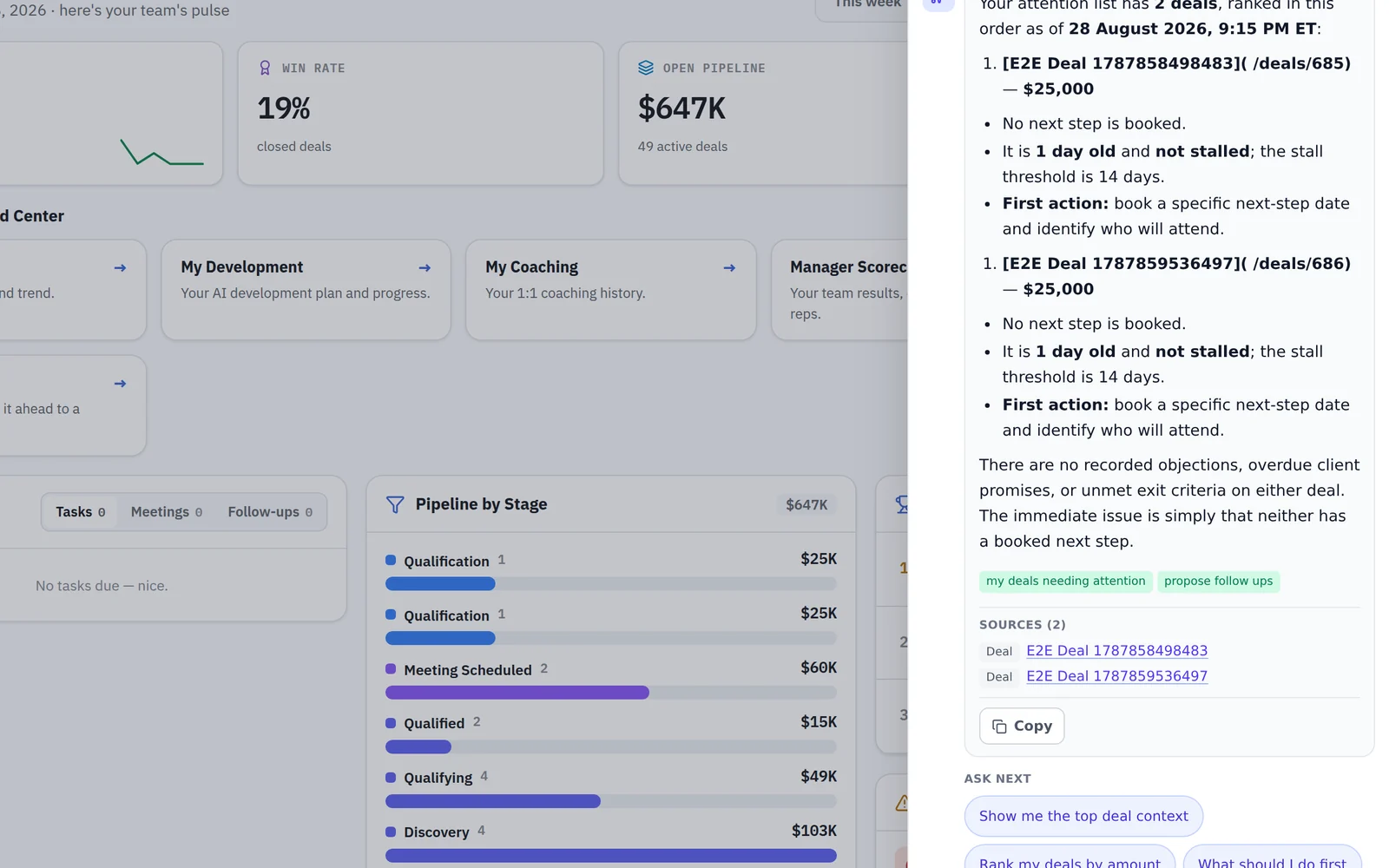
Reading
The questions your team is already asking.
A rep digs into a deal minutes before the call. A manager asks why one rep closes what another cannot — and gets the scorecards, the calls and the coaching record behind the difference. An owner asks where the quarter really stands. Every area below is scoped to what you are already allowed to see.
Doing
When you want it to do something, it asks you first.
Maddox can change exactly six things. Every one of them is proposed to you first, and applied by the server only after you approve it.
Trust
Where the edges are
An assistant with access to a CRM is only useful if you know exactly what it cannot reach. Both of these pages are about limits.
Examples
Questions people actually ask
A normal CRM answers the questions somebody built a report for. MADDOX answers the one you have right now, and shows where the answer came from. These are the questions owners, sales managers, account executives and BDRs bring to it, and what comes back. Names in brackets stand in for your own reps and customers, and every answer is limited to what your permissions already let you see.
For the owner
An owner’s questions are about the whole business, so the answers come from the stored, dated figures the team already committed to rather than a number worked out on the spot.
- “Where does the quarter really stand?” Each rep’s stored forecast — commit, best case, pipeline, closed and quota — as they committed it, beside the overnight pipeline snapshot by stage, quoted with the date it was taken.
- “Which deals across the team have gone quiet?” The deals with no next step, an overdue one, a close date already past, or longer in stage than this team’s own deals usually sit — named, not just counted.
- “What did we promise [company], and what did they promise us?” The open commitments on the deal in both directions, each with the quote and the meeting or document it came from.
For the sales manager
A manager’s questions are about people, which is exactly where an assistant should be most careful. Maddox answers them from scorecards, recorded call behaviour and the calls themselves.
It shows you the difference; it does not decide what the difference means. Maddox does not rank people or pass its own judgement on anyone, and where a figure rests on too few calls, or a rep is still ramping, that is said beside the number. The performance page walks through the first question below in full.
- “Who on the team is doing better this month, and why?” The scorecards of every rep you are responsible for, this month against last, each figure with the sample it rests on — then the call behaviours that differ, and the calls behind them.
- “Why is [rep] closing more than [rep]?” Both reps’ win rate and attainment history, the playbook steps each one most often misses, and how often each took a close the customer offered on a recorded meeting — with the moments themselves, so you can listen rather than take its word.
- “What did our best rep say on calls that the others don’t?” The actual exchanges behind her rates — getting past the gatekeeper, asking for the meeting, asking again after a no — with speaker, timestamp and a link that plays the moment, beside the same moments from another rep.
- “Prep me for my 1 on 1 with [rep].” Their prep page: the funnel since your last 1 on 1 against its goals, the commitments still open with the manager’s ruling kept apart from the model’s proposal, and when you last met.
For the account executive
An AE’s questions are about one deal and one number. The deal answers come from the deal record, its graded meetings and what the customer actually said, and the deals page walks through the first one below step by step.
- “How do I close the [company] deal?” The deal as recorded — stage, qualification, the grader’s one thing to do next, the open objections, the facts still missing — plus the buying signals in the customer’s own words and every moment there was to ask for the close.
- “What’s standing between this deal and a signature?” The exit gate and move-forward checklist for its stage, the gaps on the deal sheet, the objections not yet beaten and the promises still owed on either side.
- “What objections has [company] raised, and how did we answer?” Every time an objection came up: who raised it, at which step, the quote, and whether it was beaten — and the call can be opened at the exchange where it happened.
- “Which of my deals need me today?” Your own deals, already ranked, each with the reason it was flagged: no next step, an overdue one, an open objection, an unmet exit criterion or an overdue promise to the client.
- “Am I going to make my number?” Quota, won, attainment and days left, the run rate the gap needs per day, and commit and best case against what remains. The quota needs scorecard permission and is reported as withheld without it.
For the BDR
A BDR’s day is dials, connects and booked meetings, so the questions are about pace. None of these needs a management permission: a rep can ask about their own numbers without asking anyone.
- “Am I on pace for my weekly call target?” Calls made against your weekly target, day by day, and today’s dials and connects against where you should be by now. Where no target is set, it says so rather than showing a zero.
- “Who do I need to call back today?” The callbacks you promised, the booked meetings that have come due, and the appointments still waiting to be confirmed.
- “How often do I ask again after a no?” Your re-ask rate, counted only over calls where somebody actually said no, with the denominator stated and the refusals themselves listed so you can play them back.
For anyone, first thing
Under every answer Maddox offers a few follow-up questions, filtered to what you can actually reach. When an answer turns into something to do — a follow-up task, a meeting — it puts a card up for your approval instead of doing it.
- “What should I be working on this morning?” What you owe by due date, which of your deals need attention, and revenue attainment against target — or the reason there is no figure, such as no target having been set.
The mechanism
What decides whether Maddox can answer you at all
The assistant is not one capability with a permission on it. It is a registry assembled per person, per page, on every turn — and most of what makes it trustworthy happens before the model is asked anything.
Four gates, evaluated in order
A tool reaches you only if it survives all four. First a deployment-wide switch, which is one configuration read that stops the bill for an entire installation. Then the deny list, evaluated before anything can grant a tool and applied to every user including a full administrator. Then your workspace’s modules, resolved by the same predicate that gates the ordinary routes, so the assistant can never offer a capability whose screens your workspace has switched off. Then every permission the tool declares, all of which must pass.
Two of those four are reported back to you by name. A module that is off is named — and it names one that is actually off rather than the first one the tool declares, because telling somebody to go and ask an administrator about a module that is already on is worse than saying nothing. A permission gap is reported as a permission gap. The other two are absences rather than messages: a denied tool is dropped while the registry is being built, and the deployment switch short-circuits before a registry exists at all. You do not see a refusal for those, because there was never an offer.
Seventy-four tools in twenty-one areas, and at most four opened per turn
Six tools are attached on every turn regardless of where you are — resolving a name to a record, pulling your briefing, listing what you can do, opening an area, proposing follow-up questions and opening a page. The other sixty-eight live in twenty-one areas, and the assistant opens at most four of them in a single turn.
That cap is a grounding limit rather than a performance one. A model that can open every area will, and an assistant holding every tool at once stops choosing between them and starts guessing which is relevant. The area belonging to the page you are on does not count against the cap, because that was not a choice it made.
- Deals, a deal drill-down, deal evidence and objections, the pipeline and a deal’s buying signals
- Contacts and companies — one record read block by block, plus the nightly rollups of the whole base
- Campaigns and their analytics, with a separate area for campaign changes, so reading one and altering one are different grants
- Engagement and attribution — opens, clicks, replies, deliverability, audience sizing, whether a person may be contacted at all, and which touches earned the credit
- Coaching, calls, transcripts and evidence, a rep’s full panorama, 1 on 1 prep, and your own scorecard and day
- What is owed — the obligations a deal or a person is carrying
- Tasks and meetings, one of the two places in which anything is written; campaign changes is the other
What that lets you ask, and what comes back
In practice the areas map to the questions people actually bring. How a campaign is performing and who it is still holding. How big an audience is before you build it, and whether your sending domain is healthy enough to reach it. Which emails a contact opened and what they clicked. Which touches a won deal can be attributed to. Everything about one rep in a single read — activity, scorecard, coaching record and commitments. What each side still owes on a deal. Which buying signals a deal has been giving off, and which objections are still open.
Where a result has a shape worth seeing, the answer can include a chart. The model never draws it: the chart is derived on the server from the data the tool returned, and when the data is too thin or too uneven to plot honestly, there is simply no chart and the written answer stands on its own.
The definitions block is measured, and an overrun is logged rather than cut
The list of tool definitions is re-sent on every model round-trip within a turn, which makes it the one prompt component whose cost is easy to add to and impossible to notice. It is budgeted at roughly twenty-eight thousand characters — about ten thousand tokens at the ratio measured for the model this feature runs on — and measured against that budget on every turn. Nothing is silently trimmed when it goes over: cutting definitions would remove capabilities mid-conversation, so the payload is sent and the overrun is written to a table you can query. The worst case the budget is tested against is not an administrator, it is an administrator on an anchored page who has then opened the maximum four extra areas.
Questions
The things people actually ask.
Does MADDOX work with ConnectWise?
Alongside it, through an early-access connector that is switched on per workspace rather than running by default. Once connected, your companies and their agreements sync into MADDOX — names, sites, industry, headcount, contract values, renewal dates and terms — so you sell against the client list you already service. Tickets, dispatch and time entry stay in the PSA. Autotask and QuickBooks connect the same way, under the same switches.
What kinds of questions can I ask Maddox?
Anything your CRM already records that you are allowed to see. Owners ask where the quarter stands, managers ask who is doing better and why, account executives ask how to close a named deal, and BDRs ask whether they are on pace for their call target. Every answer comes with the calls, scorecards or deal records it was read from.
Where does Maddox get its answers?
From your own CRM, through a fixed set of tools, at the moment you ask. It is instructed to answer only from what its tools returned this turn, and to say it does not have something rather than infer it. Figures are quoted from the tool that returned them, never recalculated or combined across different ledgers.
Can it see data I am not allowed to see?
No. Every tool declares the permissions it needs, and all of them are checked against your account before the tool is even offered, then checked again inside the tool when it runs. Where a specific field is withheld from you, Maddox reports it as withheld rather than as zero or missing, because those are different facts and you would act on the difference.
Can it change or delete things on its own?
No. The conversational loop is structurally read-only: the assistant can only read or propose. Anything that changes data is a separate step that runs after you click approve, and it executes from arguments the server stored rather than anything the browser sent.
Does it work if a module is switched off?
It stops offering that area entirely. Module availability is resolved by the same predicate the rest of the product uses to gate routes, so the assistant can never offer a capability whose surface your workspace has turned off.
What does it cost to run?
Every request is logged with its model, token counts and cost, and is visible in your workspace. There is a per-user monthly spend cap, on by default, which an administrator can raise or lower per workspace.
Ask it something you already know the answer to.
That is the honest way to evaluate an assistant. Bring a question you can check, and see whether the answer and its sources hold up.