You already know what the client needs. The hard part is showing them.
An MSP sells on evidence: what is actually on the estate, what it is costing, and what happens if it is left alone. Collecting that is the job you are good at. Turning it into something a client will sit through is the evening afterwards — and that evening is where the deal usually dies.
MADDOX is a general CRM that went all the way in on this industry first, because three things about the way an MSP sells break a general-purpose CRM. The sale is assessment-led, so the pitch is a document rather than a pipeline stage. The person who wins the client is usually the person who keeps them afterwards, so a handover-shaped CRM fits nobody. And margin is watched per seat, per client, every month — so a tool with an unpredictable bill is a tool that gets cancelled.
Assessment-led selling
Leave the client site with the assessment scored and the deck already built.
IT Audit is the module built for this motion, and it is the clearest single reason an IT service business picks MADDOX over a general CRM.
Score the estate against a template you control.
Every score item is rated 1–4 — poor, fair, good, excellent — and that scale drives the colour coding the client actually reads. Because the template is yours and the scale is fixed, two engineers assessing two clients produce comparable results rather than two opinions, and last year’s audit can be set against this year’s.
The assessment carries its own sections and score items, a business-impact library and best-practice guides, so a finding arrives already attached to what it means commercially rather than as a red cell somebody has to explain.
The deck is built off the assessment and the deal.
The presentation builder assembles the findings, the impact of each one and the recommended actions into a client-facing deck you can walk somebody through, built from the assessment rather than retyped out of it. The hours you would otherwise spend assembling a report happen while you are still in the car park.
IT Audit is an add-on bought from the Marketplace rather than something a new account discovers already running, and a second add-on, the Network Scanner, files evidence from endpoint agents, a perimeter check, an email-security check and a cloud posture read against the same assessment.
IT Audit
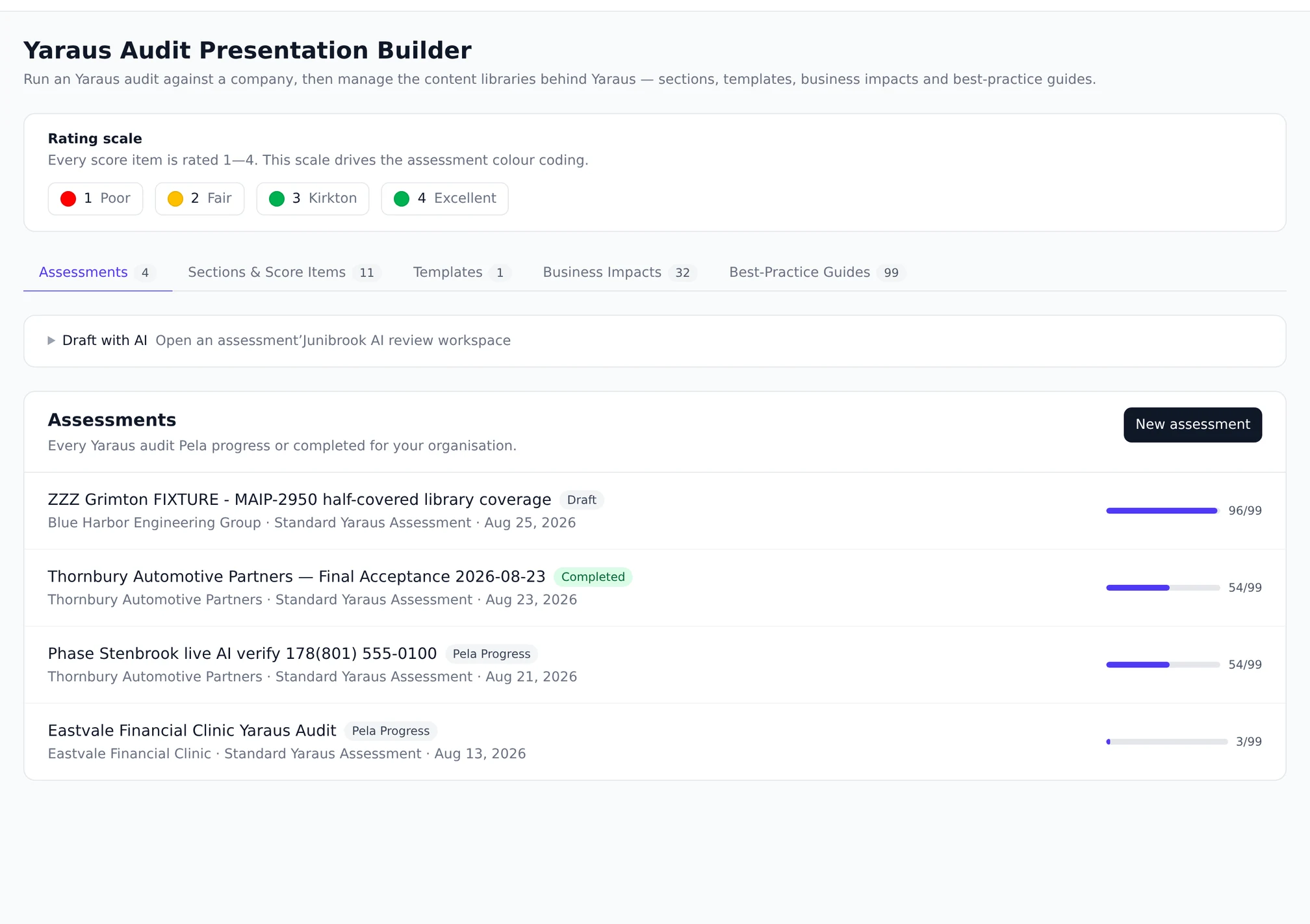
Every assessment, with how far through it is.
Assessments in progress and completed for your organisation, each showing the company, the template it runs against and how many score items are answered. The list is the working surface: an audit half-done on site is an audit you can pick back up from the office.
- One row per assessment, scored against a structured template rather than a notepad.
- Progress is visible, so a half-finished audit is not a half-remembered one.
- Completed assessments stay readable, which is what makes a re-audit a comparison.
The scored items
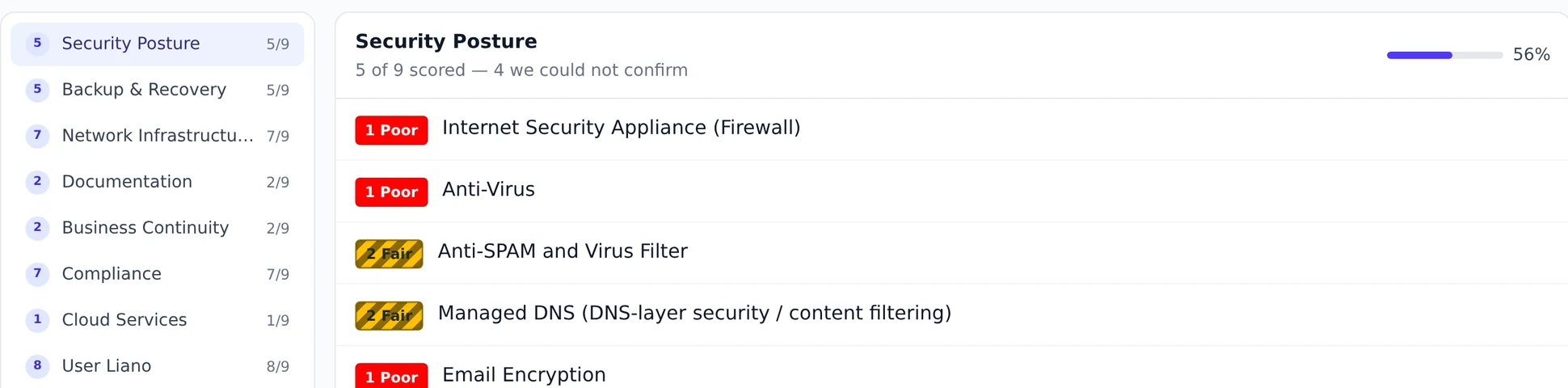
A 1–4 rating on every item, and the colour follows it.
The scoring screen is where an assessment stops being notes. Each item takes a rating on the same four-point scale, and the assessment’s colour coding is derived from those ratings rather than applied by hand — so what a client sees in the deck is what the engineer actually recorded on site.
- Four ratings on one scale, so two engineers produce comparable numbers rather than two opinions.
- The colour a client sees is derived from the rating, not applied afterwards by whoever built the deck.
- Last year’s assessment stays readable, which is what turns a re-audit into a comparison.
The deliverable
The presentation builder, and the libraries behind it.
Sections, templates, business impacts and best-practice guides are content libraries you own and edit. The builder reads them, so improving a recommendation once improves every deck that uses it from then on — rather than living in whichever proposal happened to be open.
- Sections, templates, business impacts and best-practice guides are yours to edit.
- Improve a recommendation once and every deck built afterwards carries the better version.
- The deck assembles off the assessment and the deal, rather than being retyped out of them.

Beside your PSA
It does not want to be your PSA, and it says so.
The fastest way to lose an evaluation here is to imply a ticketing replacement. MADDOX does not, and the integration is exactly as wide as it is.
What actually crosses from ConnectWise.
The ConnectWise connector is early access and switched on per workspace rather than running by default. Once connected, two things sync: your companies and their agreements. Company name, website, phone, industry, type, annual revenue, employee count and address; and for each agreement its name, value, renewal date, term and status. The customer list you sell against becomes the one you already service, with contract values and renewal dates attached, and nobody retypes it.
Autotask and QuickBooks connect through the same settings, with the same sync configuration, the same enable toggle and the same run history.
What deliberately does not cross.
Tickets, dispatch and time entry stay in the PSA, because that is what a PSA is good at and replacing it is not the offer. What MADDOX adds is the layer none of those systems was built for: the calls and what was actually said on them, the coaching that comes off those calls, the pipeline, and the ability to ask one question that touches all three.
The helpdesk module inside MADDOX exists for the support your own business gives its customers — it is a helpdesk, not a PSA, and the module page says so in its own words.
Marketing that fits the motion
Campaign packs written for managed services.
Most IT service businesses do not have a marketing team. They have an owner with an evening. A pack is a complete journey — lanes, steps, goals and the email copy — that installs as a draft you read before anything sends.
The motions this industry actually runs.
Break-Fix to Managed Services works current break-fix clients toward a fifteen-minute discovery call: three emails and two phone calls over eight days, then a grace period before the contact exits as unresponsive. TBR — Technology Business Review is the recurring client review, an eight-day push to get the review on the calendar with the prepare and conduct tasks attached. A direct-mail prospecting pack pairs a printed letter with a multi-channel follow-up.
Each installs versioned, shows a real three-way diff before an update touches anything you have edited, and sends nothing until you launch it. A campaign lands as a draft, and a draft has never sent anything.
Reselling it
Or sell MADDOX to the clients who keep asking you which CRM to buy.
They already forward you the spreadsheet and ask what they should use. The partner programme is built for that conversation rather than bolted on after it.
Their workspace, provisioned and supported from your console.
You provision the workspace, you hold its subscription level, you invite their people, and you are the one they call. Working inside a client workspace happens through a managed seat — a real user row that is not a person, so ownership and audit rows point at something real — and every session carries your name, your written reason, its start, its end and its write count.
That audit trail is not a compliance checkbox. It is the thing that makes working inside somebody else’s business defensible when they ask what you did in there.
Questions
The things people actually ask.
Does MADDOX replace ConnectWise or sit alongside it?
Alongside it. Through an early-access connector switched on per workspace, MADDOX syncs your companies and their agreements out of ConnectWise so you sell against the client list you already service, and leaves tickets, dispatch and time entry where they are. If you are looking for a PSA replacement, this is not one, and we would rather say that now than three weeks into a trial.
What exactly syncs from my PSA?
Companies and agreements. On the company: name, website, phone, industry, type, annual revenue, employee count and address. On each agreement: its name, value, renewal date, term and status. Autotask and QuickBooks connect the same way, each with its own sync configuration, enable toggle and run history so you can see what moved and when.
Is IT Audit included in my plan?
IT Audit is an add-on bought from the Marketplace, and so is the Network Scanner that sits on top of it; neither can be switched on from settings. The pricing page describes what a subscription level can and cannot take away — a level can only remove a module, never switch one on over your head.
Can I resell MADDOX to my clients?
Yes, and it is a proper programme rather than a referral link. You provision each client workspace from one console, set its level, invite their people and support them inside it through a managed seat that records your name, your written reason and every write. Commercial terms are a conversation — start on the partners page.
Do the campaign packs work for both break-fix and managed services?
That is the point of the Break-Fix to Managed Services pack specifically: it is built to move a current break-fix client toward a discovery call rather than to prospect cold. Packs install as drafts, so you can read the whole journey — every email, every wait, every goal — before deciding whether it fits how you talk to your own clients.
How is one client’s data kept out of another’s?
Isolation is enforced in the data layer on every query rather than remembered by each feature, so a new feature cannot forget it. For a business holding its clients’ data that is the question that matters, and the security page describes the whole model including field-level permissions and the audit trail.
Where to go next
See it against your own pipeline.
MADDOX is opening to new teams by invitation. Ask for one and we set you up on your own pipeline, or bring us the one you already argue about and we will walk it with you.